 |
|
|
|
Sun System Handbook | Home | Systems | Components | General Info | Search | Feedback |
|
|
||
 | ||

|
|
|
|||||||||||||
|
||||||||||||||
|
||||||||||||||||||||||||
|
|
||||||||||||||||||||||||
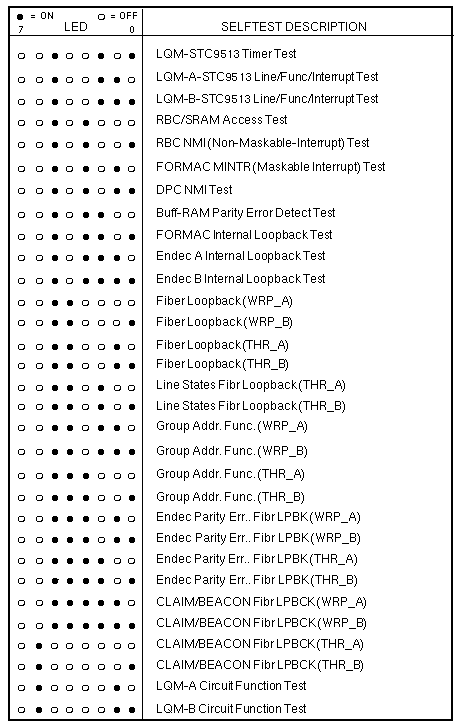
FDDI/DXSelftestNormal mode selftests run at powerup when the DIAG/NORM switch is in the NORM position. Attach a terminal set for 9600 baud, 8 data bits, no parity, and 1 stop bit to the serial port to monitor normal mode selftest output. Extended SelftestsExtended selftests are run with the DIAG/NORM switch in the DIAG position. Attach a terminal set for 9600 baud, 8 data bits, no parity, and 1 stop bit to the serial port, and attach loopback cables between ports FDDI-A and FDDI-B. Enter s to enable the extended selftests. Enter a to display the Diagnostic Engineering Monitor (DEMON) menu. LEDsLEDs indicate the status of the FDDI PCB and the network during operation.
LEDs 4, 1, and 0 indicate connection status for port FDDI-A. LEDs 4, 3, and 2 indicate connection status for port FDDI-B. LED 4, RINGOP, is ON when the ring is not operational. LED 5, PACKETIO, changes state each time a packet is received or successfully transmitted. LEDs 6 and 7 blink alternately four times per second under normal conditions. LEDs 6 and 7 blink together two times per second when a non-recoverable firmware problem occurs. LED Patterns During Selftests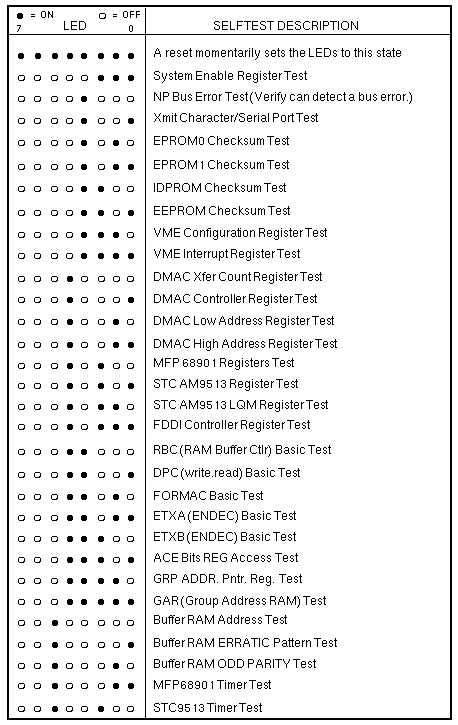
| ||||||||||||||||||||||||
|
||||||||||||||||||||||||